Product Categories may be used in Inventory and Sales reporting to categorise products together. Product Categories are made up of one or more Product Groups in the system. They are really a reporting consolidation point and have no specific role in the system other than being a good summary of the Product Groups that are allocated to them.
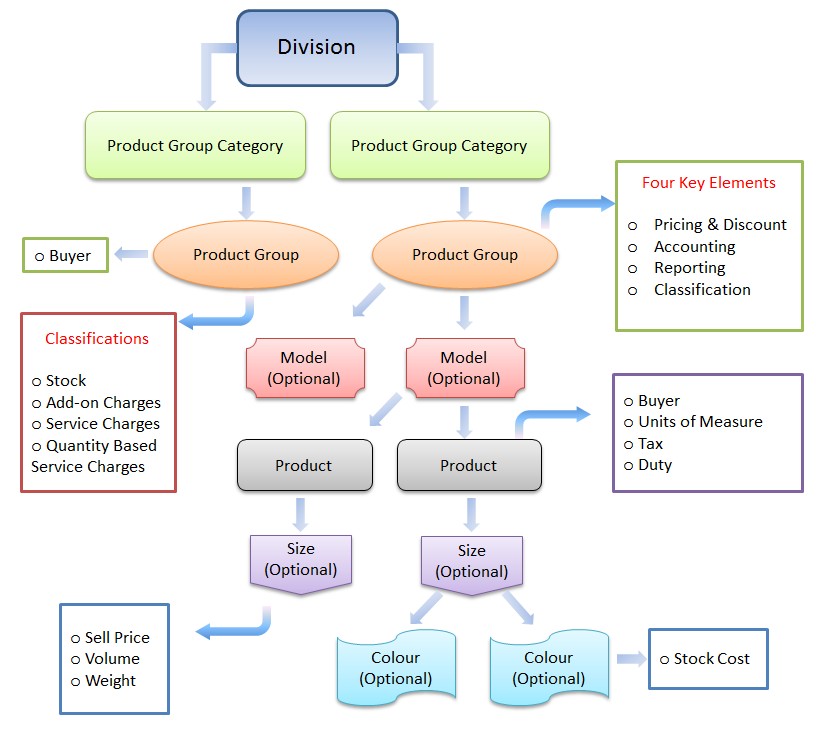
A good guide to the use of Product Categories is to avoid having more than a page/screen full of them since their main purpose is to summarise all your products/inventory/sales into a clear snapshot of your entire range. Categories are also available throughout the system as a reporting filter for easy selection of particular product ranges.
Take a look at the Inventory Schematic for a good visual representation of where Product Categories sit in the overall Inventory hierarchy.
Example
Within product category ‘Mens Shoes’ you may have product groups:
- Boots
- Sneakers
- Dress
- Casual
Minimum Requirements
Product Category is a required field on Product Groups so you must set up at least one Product Category.
Changing Established Data
You can add new product categories and change product groups assigned to categories at any time.
Panel Options
- Standard panel features
- Maintenance
- Views
- Where used – products – lists products under the category being viewed
- Where used – groups – lists of product groups under the category being viewed
- This month’s sales – shows sales to product groups belonging to the category being viewed for the current month
- Change audit – lists an audit of data changes made over time to the category currently being viewed
- Reports
- List Product Categories
Related Topics
- Product Details