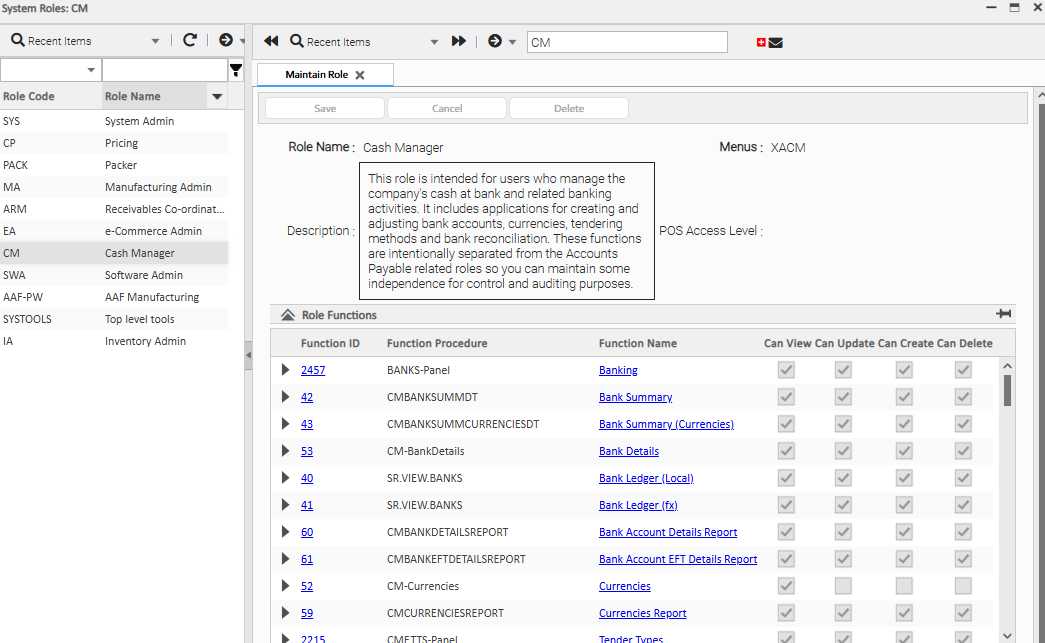
Roles are a collection of security access to functions.
Roles are designed to match workplace roles in your organisation. Chief Financial Officer, Sales Manager, Sales Rep, Warehouse Picker, Chief Executive etc.
Each role has many functions (applications) that user’s may need to complete tasks within the system. For example:
- the CFO will want to run a P&L reports
- the Warehouse User will want adjust picking dockets
- the Sales Manager will want to compare sales to budget
- the Inventory Controller will want to replenish stock
The System Administrator need only assign roles to a user and does not need to set access for the many hundreds of functions within the roles (though it is possible to bar users from individual functions if needed).
The concept is that the functions within each role closely match a given “type” of user’s requirements for the system.
Where possible, a user should only need to have one role allocated to them. However, there will always be some users who work across multiple areas of the business and so require several roles to be allocated.
The fewer roles a user has, the less options they have which simplifies the user-interface navigation choices on their desktop.
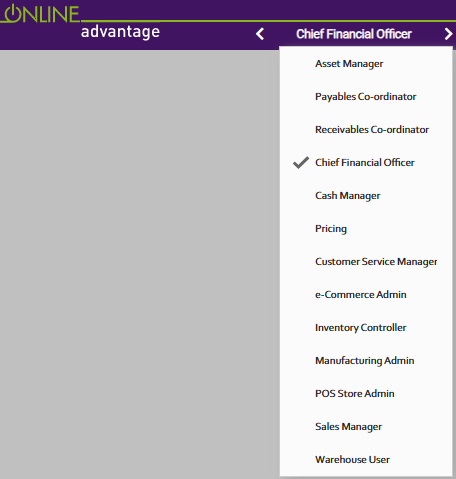
Where a user has two or more roles allocated to them, they can switch roles via the desktop navigation tools provided when required. Using the “Switch To” tool will also allow the user to change roles dynamically.
A user’s current role is always shown in the system navigation bar. When a user switches roles, the menu dynamically changes to show the functions allocated to the current role.
In summary, roles are a collection of “security access” settings to a specific list of functions that have been selected as being appropriate for a given type of user to have access to.
There is a ‘System Administrator’ role as part of the standard list of roles delivered with Online Advantage. A user with access to that role can use the Roles Panel to see what functions have been allocated to each role, and the specific settings on each function for that role as shown below: