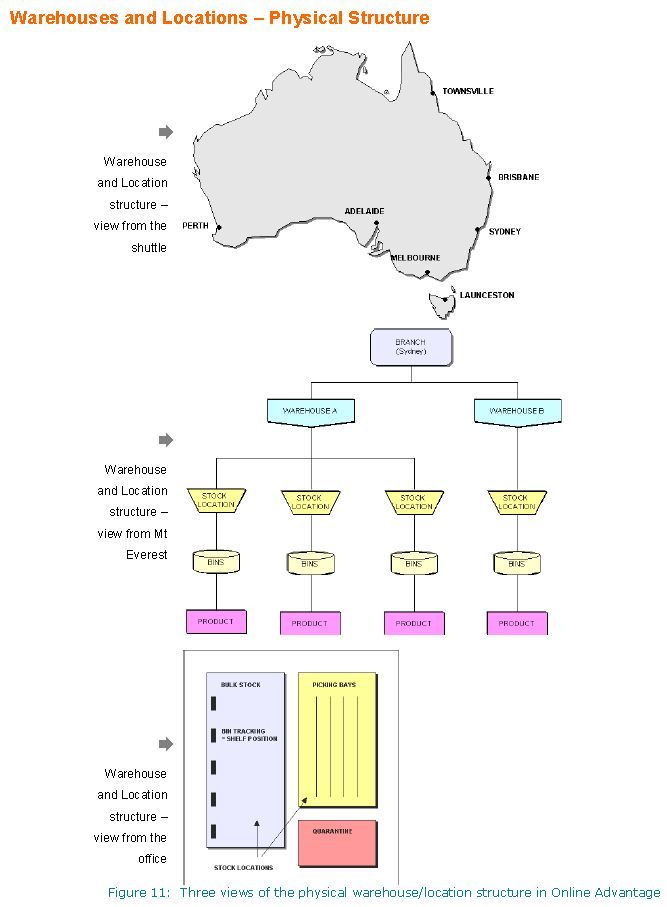
 Warehouses are used in conjunction with Stock Locations to define your warehouse setup and structure. Since multiple Stock Locations can be set up within each Warehouse, this provides an excellent reporting summary option when you need to consolidate Inventory figures i.e. Stock on Hand, Stock Value. Usage etc.
Refer to System Options for more on Warehouse Summary Detail and Warehouse Average Unit Cost options available.
Warehouses are used in conjunction with Stock Locations to define your warehouse setup and structure. Since multiple Stock Locations can be set up within each Warehouse, this provides an excellent reporting summary option when you need to consolidate Inventory figures i.e. Stock on Hand, Stock Value. Usage etc.
Refer to System Options for more on Warehouse Summary Detail and Warehouse Average Unit Cost options available.
Example
An enquiry on warehouse ‘NSW’ shows the total quantity of stock at store locations Gosford, Newcastle, Byron Bay and Wollongong.
Minimum Requirements
A stock location must be assigned to a warehouse, so you must set up at least one warehouse.
Changing Established Data
You can set up new warehouses and a assign stock locations to the new warehouse at any time. A stock location can only belong to one warehouse.
If you are using ‘warehouse average costing’ (refer to System Options) the branch of each stock location under the warehouse must be the same.
If you are using ‘warehouse summary’ (refer to System Options) you may not change the warehouse on a stock location.
Panel Options
- Standard panel features
- Maintenance
- Views
- Change Audit – shows data changes made over time to the warehouse currently being viewed
- Where Used – shows a list of locations currently assigned to the warehouse
- Reports
- List Warehouses