The use of Product Groups is probably the single most important element in the creation of your Inventory structure within Online Advantage. This is because the Product Group that each Product is allocated to has a direct influence on how that Product behaves throughout the system and potentially influences such things as accounting postings, inventory costing, customer pricing, sales and inventory reporting, margin/markup control and stock replenishment.
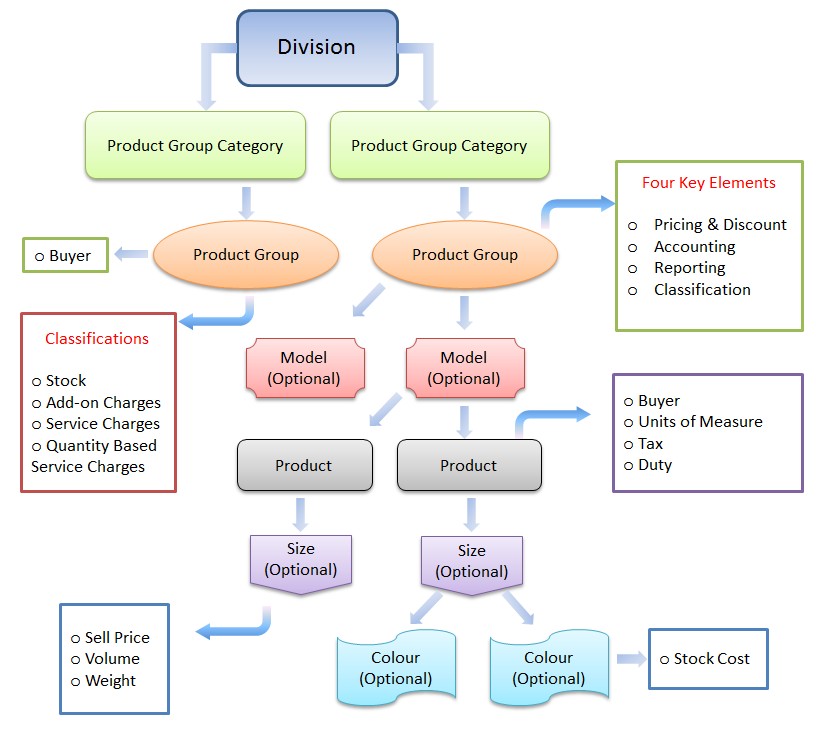
A good guide to the use of Product Groups is to avoid having more than a page/screen full of them within a given Product Category since one purpose of the Groups is to provide summarised details of all your products/inventory/sales in a given Product Category for a clear snapshot of that range.
Take a look at the Inventory Schematic for a good visual representation of where Product Groups sit in the overall Inventory hierarchy.
Groups are also available throughout the system as a reporting filter for easy selection of particular product ranges. They are used to divide the standard reports (for example, Sales or Inventory reports) by the ‘grouping’. Reports, for example, can be selected for a particular Group, or Groups, or sub-divided on the basis of Product Groups. By careful selection of your Product Group coding, you can organise your system to meet your exact requirements.
As mentioned, one important role Groups play is in the ability to set customer pricing. The system allows a customer to have specific pricing rules at the Product Group level, including group discounts and price level settings in the Customer Details function. This includes the ability to exclude a customer from buying specific a Product Group or Groups if required.
As you will see below, another important function of the Group level is to hold all the accounting postings for the automatic General Ledger interface from the Inventory, Purchasing, Manufacturing, Order management, Point of Sale and Job Costing functions. All the settings for accounting can be different on each Group you establish in the system if required to provide you with full control over the account postings to the General Ledger.
For example, if you are required to differentiate between Finished Goods and Raw Materials in the Balance Sheet you can allocate different Stock on hand Control pointers in the Product Groups for those products. Similarly, if you would like to see a breakdown of Product Groups/Categories of Sales in your P&L you can set different control pointers per group for Sales Postings to appear separately in the P&L.
Product groups can also be used to set the definition for Divisional General Ledger postings where the Sales Division is set to Product. For example, if you are required to report on profitability by Product line you could establish separate Divisions which can be linked to the Product groups.
Finally, Product Groups can also be used to vary the Over-Ride of Lowest Margin % in Order Entry by Product Group and set Default Buyers at a total and location level.
General Notes on Product Groups
Account Postings for Add-on and Service classifictions
The system will not post any values for the “Inventory” related postings (like Stock and Cost of Sales) for Groups setup as Service/Add-On classifications. Only the “Sales” posting accounts are used. However, since all account inputs are mandatory, it is suggested that a “suspense” account or an account that you designated does not get used be entered into these redundant posting prompts.
Mixing Units of Measure within Product Groups
It should be noted that if you have products with different ‘Units of Measure’ within a Product Group, then many reports that are providing ‘Quantity Totals’ will be meaningless. For example, paint might be sold in 20 litre cans as “eaches” or a “tin” and the quantity could be the same as a 500 ml can of the same type of paint. Selling one of each would give a Group total of “2” but obviously the reality of the total litres sold is different so it can be misleading. There is nothing wrong with having products with differing ‘Units of Measure’ within a given Group. It is often unavoidable depending on the diversity of product range. We simply bring it to your attention so that you can avoid it where possible.
Rounding
If you wish to track rounding amounts in your General Ledger, then we suggest you assign the ‘Rounding’ product to a separate Product Group on its own. This is because the “Sales” account posting comes from the Product Group so if you have a ‘Rounding’ group for that sole purpose you can change and control the Chart of Account posting so that it is separated in your GL. The same principle can be applied to any other type of posting, be it a Product, Service or Add-on Charge.
Example
Within product category ‘Footwear’ you may have product groups:
- Boots
- Sneakers
- Dress
- Casual
Minimum Requirements
Product Group is a required field on Products so you must set up at least one Product Group.
Changing Established Data
Add new product groups at any time.
When changing the GL account assignments on Product Groups, be aware that the changes do not take affect until the next End-of-month process is run and GL figures are not retrospectively updated for prior months.
Be careful when changing the Product Group classification as this changes the nature of any products assigned to the group. For example, if you have a product assigned to a group that is classed as a ‘material’ item, then changing the product group to be an ‘add-on’ classification cause the products allocated to that group to be cleared of such details as stocking units.
For sales that have been summarised by product group, switching products to another product group does not get reflected in the sales figures retrospectively.
Panel Options
- Standard panel features
- Maintenance
- Views
- Change Audit – lists data changes made over time to the product group currently being viewed
- Where used – lists the products assigned to the product group currently being viewed
- This Month’s Sales – shows sales of the product group being viewed for the current month
- Reports
- List Product Group Details
- List Product Group Account Details
- List Product Group Buyer Details