US date format
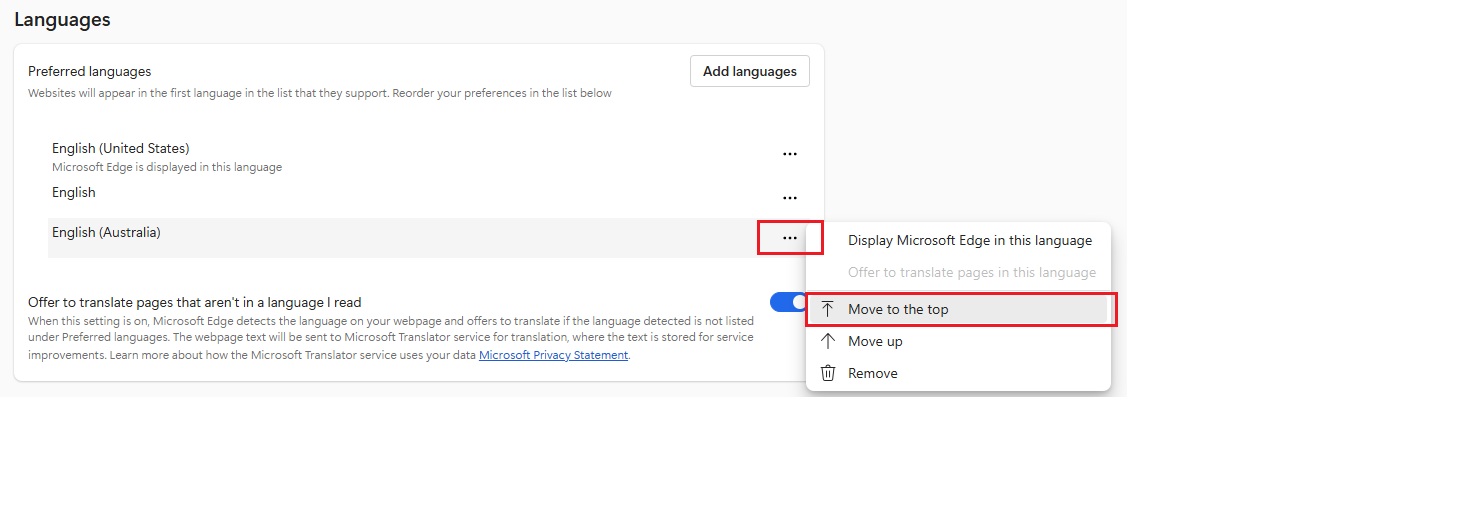
If you are seeing dates in US format i.e. MM/DD/YY, you can change this behaviour by using the browser ‘language preference’ setting. For the Edge browser, you can use this link: edge://settings/languages
Once there, move ‘English’ or ‘English (Australia)’ to the top of the preferred list. If those languages aren’t appearing on the list, then add one of them in and move it to the “top” so it’s the preferred language used by the browser. That will cause the browser to show dates in the DD/MM/YY format style.
Point of Sale
Point of Sale Tender Type availability
At the Point of Sale counter, it might not make sense to offer ‘Direct Deposits’ as a tender method, or you may decide you are not going to take payments via a particular card e.g. ‘Diners’ or ‘American Express’. Also, you might not want to allow someone to buy a store gift card and have them pay using another gift card.
To control what tender options are available in Point of Sale you can set where a given Tender Type is available for use under the Tender Code.
When you change the applications that a tender type is available for, give it a minute or two before trying Point of Sale because a little time is required for information in the cache to be refreshed or else close your session and login again.