
You can have as many price lists in OA as you require as part of the Pricing Matrix.
Each Price List permits you to define separate Costs and Prices for your Products.
Each Price List can have up to 5 different price levels recorded against it for use when pricing products to customers.
The system has a built-in “Default” Price List so you do not need to set up additional Price Lists unless you have specific reasons for doing so.
Examples
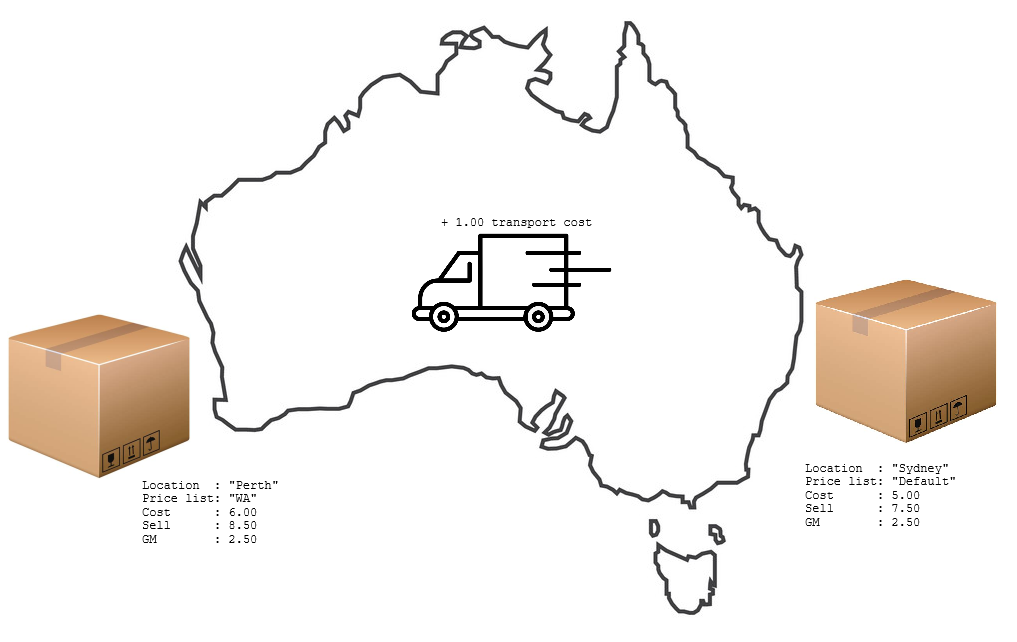
Multiple price lists might be used is when goods are manufactured or received into a primary branch e.g. Sydney, at a unit replacement cost of $5.00 and sold at a retail price of $7.50 (Price Level 1). Shipping these goods to the Perth branch would incur an incremental unit cost e.g. $1.00, making the unit replacement cost in the Perth branch equal to $6.00. To realise the same gross margin on sales of the product, the retail price (Price Level 1) in Perth would have to be increased to $8.50. Establishing a separate Price List for the Perth branch permits both sets of pricing to co-exist on the system, and to be selectively employed when appropriate based on the issuing location or customer purchase point.
Minimum Requirements
The “Default” price list is built-in so you do not need to establish any additional Price List codes.
Changing Established Data
The “Default” price list name is fixed and cannot be changed.
You can add new Price List Codes and change the details of existing Price Lists Codes at any time.
You can change the Price List assigned to a Customer at any time, but this will not automatically change the selling price of any outstanding orders.
You can change the Price List assigned to a Location at any time. Outstanding orders will be invoiced with the cost on the new Price List. Costs on existing invoices are not back dated retrospectively.
You can use the ‘Where Used’ view to see a list of Customers or Locations assigned to the Price List you are changing.
Panel Options
- Standard panel features
- Maintenance
- Views
- Audit – lists data changes made over time to the price list currently being viewed
- Where used – lists customers and location assigned to the price list currently being viewed
- Reports
- List Price Lists Codes